Skip to content
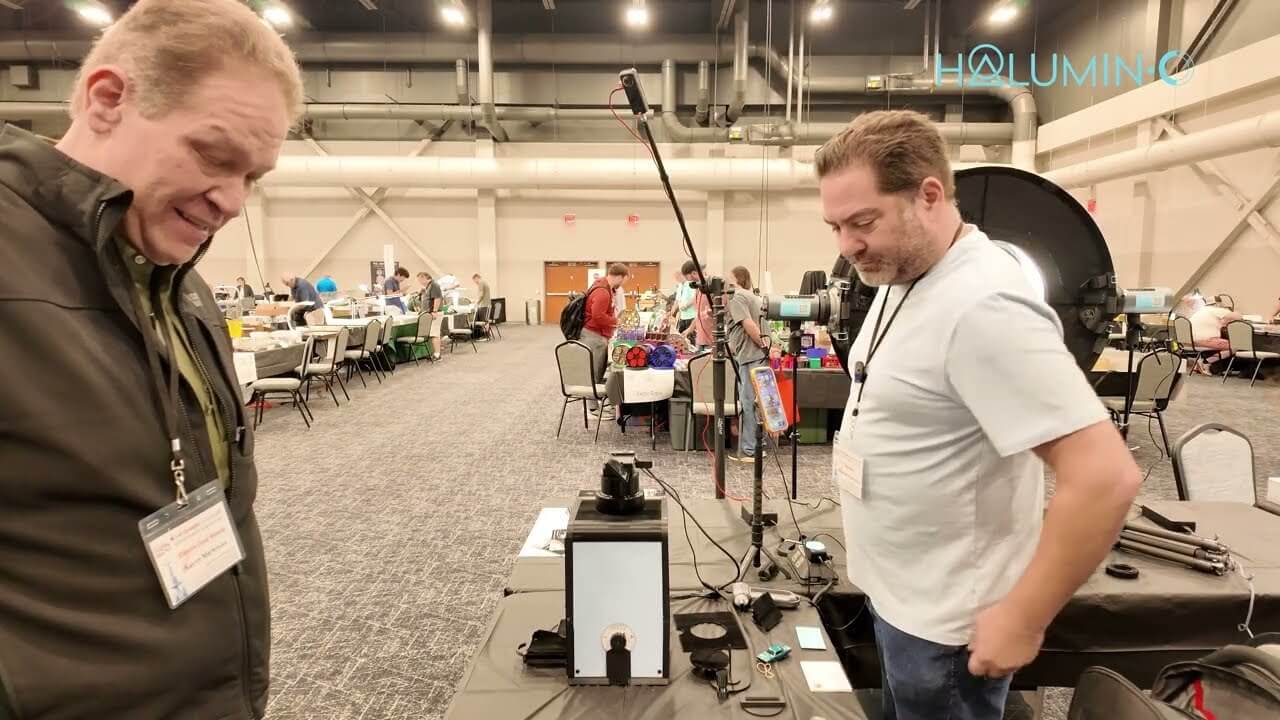
Coin shows have a way of blurring lines. Walk the aisles at the Greater Cincinnati Numismatic Expo long enough and you stop being sure who’s a dealer and who’s a collector, and you start to suspect the best people are a little of both. Then you meet a man with literally thousands of toned coins who tells you, without a trace of irony, “I buy them, I don’t sell them.” The professional dealer standing next to him has the diagnosis ready: “That’s an addiction, not a business.” He calls them his babies, and once he started sliding slabs across the table, I understood why.
He’d been buying toned coins back when nobody wanted them, when collectors chased bright white silver and dipped the color right off. Now the hobby calls them numismatic opals. So I set the Halumin-C down right there on the show floor, lid on and iPhone on top, no dimmed room and no studio, and we started working out how to photograph toned coins so the color looks the way it does in hand: a rainbow Morgan dollar, a 1961 Franklin half with the word “HEAD” toned into it, and a rare 1888-O “Scarface” Morgan. No app and no AI, just real light.
Toned coins are hard to photograph because their color lives in a thin surface film. Change the light a little and the colors shift, deepen or disappear. Below you’ll find the video, the stories behind the coins, a step-by-step method for toned coins, and answers to common questions.
Key Takeaways
- Lid on, shoot anywhere. The lid is on by default, so you can get great images in any room, even on a bright show floor, with no need to dim the lights. You can also use it with the lid off, where dimming the room helps.
- Toning changes with the light. Small control changes made a toned word on a Franklin half either stand out or nearly disappear.
- Relief and color are separate choices. The halo can isolate a coin’s relief from its luster and toning. A quick adjustment then shows the color the way your eye sees it.
- Shoot an inspection view and a true-to-eye view. Each one tells buyers, graders and insurers something different.
- Slabs are fine. Every coin in the video was photographed in its holder with an iPhone.
- Labeled sliders make it repeatable. Once you like a setting for a coin, you can repeat it.
Watch: Photographing a Toned Collection at a Cincinnati Coin Show
The 4-minute video was filmed on the bourse floor of the 43rd Greater Cincinnati Numismatic Expo (June 5–6, 2026, Sharonville Convention Center). Jeremy runs the Halumin-C while a longtime collector of toned coins watches his own coins appear on screen. For a complete tabletop kit, see the Halumin Studio Set. Jeremy also narrates the video.
Why Toned Coins Are So Hard to Photograph
“Are they coin dealers or are they collectors? In the coin world, the lines can get a little blurry sometimes,” Jeremy says as the video opens. The collector at the table has “literally thousands” of toned coins. “They’re my babies,” he says. “I buy them, I don’t sell them.” A professional dealer standing nearby laughs: “That’s an addiction, not a business.”
His timing was good. When he was younger, he says, “they all wanted white coins,” and many people dipped toned coins to strip the color, “a cardinal sin” in his book. Because everyone knew he liked colored coins, they brought them to him. Today Jeremy calls toned coins “the numismatic opals”: the more vivid the color, the more desirable the coin, and how a coin toned is often part of its value.
That story is written in chemistry. Toning forms when silver reacts with sulfur, and PCGS notes that old mint sets, albums, manila envelopes, tissue paper and canvas bank bags all carry traces of it, so each storage method tones coins in its own way. NGC lists felt among the materials that cause tarnish, which explains one of the collector’s coins: it sat on a small felt pedestal, and the toning grew around the spot where the pedestal touched it. PCGS adds that natural toning takes decades, while artificial toning tends to float on the surface in bright “crayon” colors.
For a photographer, that thin film is the problem. Its colors depend on the angle and type of light, and a camera’s auto exposure tries to average everything out. You need light you can steer, a little at a time. For shooting on location, see the Halumin Freestyle Set.
How to Photograph Toned Coins: Step by Step
This method follows the demo. Halumin-C combines three lighting tools, each on its own slider: slider 1 is the axial light, slider 2 is the tone light, and sliders 3–4 control the Open Cylindrical™ halo. For more detail, see the How to Use Your Halumin C guide. Graded coins? Here is how to photograph coins in slabs without glare. New to the H18? Start with our H18 getting-started guide.
- Put the lid on. The lid (viewing cover) on is the default way to shoot, so you can get great images in any room, even on a busy show floor, with no need to dim the lights. You can also shoot with the lid off; in that case, dimming the room helps.
- Stage the coin or slab. Raw or slabbed, set it on the pedestal at a height that puts the coin just above the bottom edge of the halo.
- Set up the phone and lock exposure. Lay the phone on the viewing window, zoom to frame the coin, then touch and hold the coin until AE/AF Lock appears. You can see the lock on screen throughout the demo.
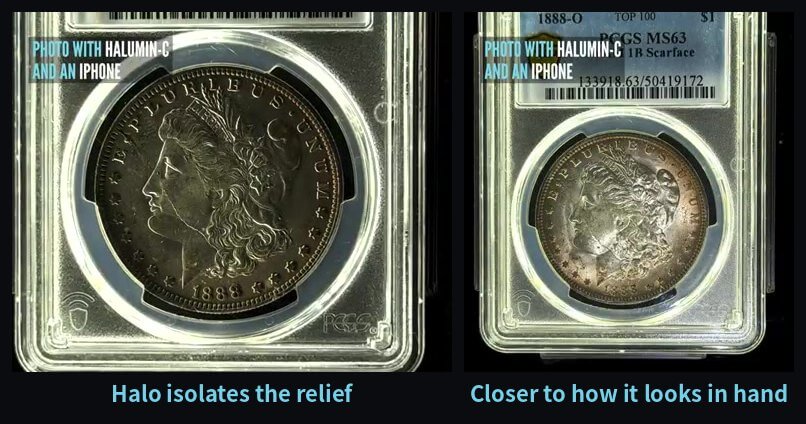
- Light the relief first. Use the Open Cylindrical™ halo (sliders 3–4) to bring out texture and depth in the design. On the Scarface, it isolates the relief from the distractions of luster and toning.
- Bring in the color. Add the tone light (slider 2), a focused sliding spotlight, a little at a time and watch the screen. Stop when the toning and any cartwheel luster match the coin in hand.
- Make small moves. Slight changes to the controls can make toning patterns stand out or fade, so adjust one slider at a time.
- Capture two looks. Take a high-contrast inspection shot for details and a true-to-eye shot for color, and photograph both sides.
- Note your settings. The sliders are labeled, so write down a setting you like and repeat it on the next coin.
How to Photograph Rainbow Toned Coins
Rainbow toning only shows when light hits the coin at the right angle. With Halumin-C, the Tone Light (slider 2) lets you bring the color up or down while you watch the screen. For the basics, see how to take pictures of coins and how axial lighting works.
Three Toned Coins, Three Lighting Lessons
A Rainbow-Toned Morgan Dollar: Let the Color Breathe
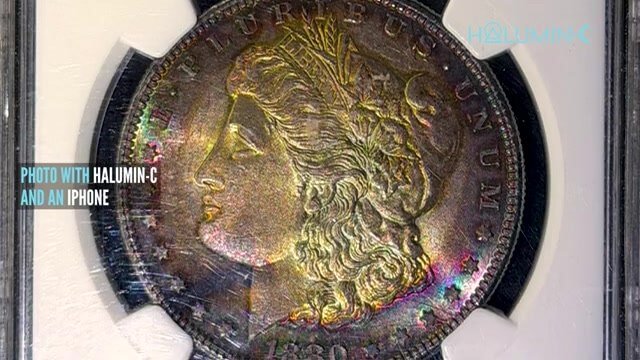
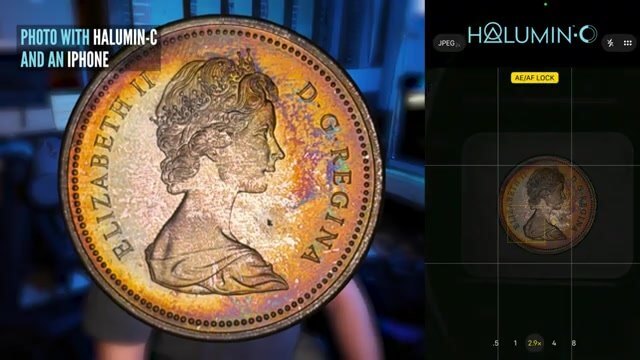
The first coin out of the collector’s box is a Morgan silver dollar with full rainbow toning. The design has a story of its own. Mint engraver George T. Morgan designed it, and the U.S. Mint struck it from 1878 to 1904 and again in 1921, across the years of westward expansion. Today, the Mint says, Morgan dollars are some of the most collected American coins in the world. Long years in storage left this one glowing gold, magenta and blue.
Here the job is restraint. Light the relief, then add color light until the bands of toning look the way they do when you tilt the coin in your hand. Too much light and the colors wash out; too little and the coin goes muddy.
A Word Toned Into a Franklin Half: Make Toning Appear or Disappear
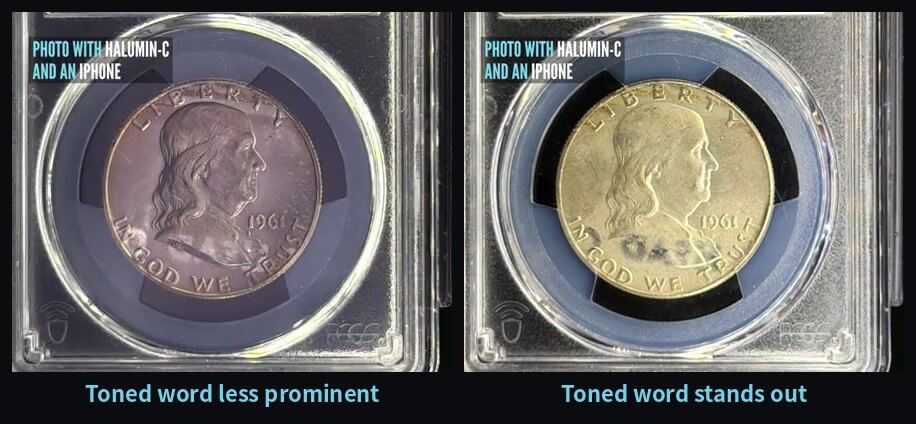
The strangest coin of the day is a 1961 Franklin half dollar with a word, “HEAD,” toned into its surface. It came from a piece of printed material the coin was stored next to. The Franklin half was the last coin designed by Chief Engraver John R. Sinnock. PCGS recounts that he died in May 1947, before the coin went into production. The Mint’s January 1948 announcement described Franklin’s “wise and kindly features” paired with the Liberty Bell on the reverse. Franklin famously disliked the bald eagle, PCGS notes, but the law required an eagle on the reverse, so Sinnock tucked a tiny one beside the bell. The series ran from 1948 to 1963; the Kennedy half replaced it in 1964.
In the video, small changes to the Halumin-C controls make the word more vivid or almost hide it. “You can’t see it with that view, but once you switch the view, you can see it plain as your nose,” someone at the table says. That is useful for more than curiosities. The same control lets you show a buyer a toning pattern honestly, or find a mark you might otherwise miss.
Toned Morgan Silver Dollars: Lighting Tips
The 1888-O “Scarface” Morgan: Relief View vs. True-to-Eye View
The most expensive coin he shows is a toned 1888-O Morgan dollar graded PCGS MS63 and attributed VAM-1B “Scarface.” The O mintmark means New Orleans, one of the branch mints that, according to the U.S. Mint, struck Morgan dollars through 1904. Somewhere in that 1888 run, a die began to crack. We also worked out how to photograph a coin die, a much deeper and rougher subject. As PCGS CoinFacts explains, the crack starts at the dot between E and PLURIBUS and, in its late stages, runs across Liberty’s face from her nose to the lower hair curls. Only those late stages count as a true Scarface, which PCGS calls “one of the most obvious, desirable, and valuable of all Morgan Dollar varieties.”
Jeremy shows the coin two ways. First, the Open Cylindrical halo isolates the relief, giving high-contrast white details that rise above the rest of the coin, ideal for studying the break. Then, with a quick adjustment of the controls, he gets a more accurate picture of how the coin looks to the eye, toning and all.
Tip: Compare It with Your Current Setup
Near the end of the video, Jeremy shows a clip of a coin shot without Halumin-C, using his Sony ZV-1, a couple of overhead lights and a spotlight. “That’s about the best I can do,” he says, pointing out the glare and how he has to keep moving the coin to find a workable angle. If you photograph toned coins now, try the same test: shoot one coin with your usual setup and once with controlled light, then compare the color and glare side by side.
As an Amazon Associate I earn from qualifying purchases.
How Halumin-C Makes Coin Photography Simple
“It is not an app. It’s not AI. It’s not a new and expensive camera,” Jeremy says in the video. Halumin-C lets you use the camera or phone you already know and gives you full control over the light. According to the Halumin-C product page and store listing, it includes:
- Three lighting tools in one: slider 1 is the axial light; slider 2 is the tone light, a focused sliding spotlight that brings out toning and cartwheel luster; and sliders 3–4 control the wide Open Cylindrical™ halo, which adds texture and depth on raw coins, slabs and larger pieces
- A lid that lets you shoot anywhere without dimming the room, which you can also remove for video (with the lid off, dimming the room helps), plus a sliding tray for quick coin swaps
- Simple, labeled slider controls, so you can repeat a setting coin after coin
- A variable-speed turntable for 360° clips, and compatibility with any camera or smartphone, copy stands and coin microscopes
Clear, accurately lit photos also help document condition and provenance for cataloguing and insurance. At the table, the photos are also wanted “for insurance purposes.” Read more in Great Coin Photos and Videos Don’t Have to Be Hard, see how a silver proof is lit in How to Photograph Coins with an iPhone, and browse first user images with Halumin C.
Pre-Order Halumin-C
The Kickstarter was a success, and production is underway with Pepetools. Pre-orders lock in a $429 discounted pre-order price, below the planned retail price, and shipping is anticipated in Q1 of 2027. Follow progress in the Halumin-C production updates.
Need one sooner? The I Need It Now Edition adds a handmade, made-to-order functional copy of the prototype that typically ships in 2–4 weeks, plus a production unit when they ship.
Frequently Asked Questions
How Do You Photograph Toned Coins Without Losing the Color?
Control the light first. With the Halumin-C lid on you can shoot anywhere, even on a bright show floor, with no need to dim the room. Light the relief with the Open Cylindrical™ halo (sliders 3–4), then bring in the tone light (slider 2) and make small adjustments until the color matches what you see in hand. Lock focus and exposure on your phone so the camera doesn’t wash the toning out.
Why Do Toned Coins Look Different in Every Photo?
Toning is a thin film on the coin’s surface, so its colors change with the angle and type of light. Small lighting changes can make toning, and even marks in it, more vivid or nearly disappear. Repeatable, adjustable light is what makes the photos consistent.
Can I Photograph Toned Coins Inside a Slab?
Yes. Every coin in this demo was photographed in its slab with an iPhone and the Halumin-C. The Halumin-C has a slab pedestal and a wide halo that covers slabs and larger pieces.
Should a Toned Coin Photo Show the Color or the Details?
Shoot both. In the demo, the halo isolates the relief of an 1888-O Scarface Morgan dollar so the details stand out, and a quick adjustment of the controls then gives a more accurate picture of how the toned coin looks to the eye.
What Causes Coin Toning?
Toning forms when silver reacts with sulfur and other compounds in the environment, often from storage materials such as old albums, paper, cardboard, felt or canvas bags. Natural toning develops slowly, over years or decades.
Does the Halumin-C Use AI or an App to Enhance Color?
No. The Halumin-C is a lighting solution, not an app, AI or a new camera. You use the camera or phone you already have, and the color comes from real, controllable light.
When Does the Halumin-C Ship and How Do I Pre-Order?
Pre-orders are open at a $429 discounted pre-order price, and production units are anticipated to ship in Q1 of 2027. The I Need It Now Edition adds a handmade, made-to-order functional copy of the prototype that typically ships in 2–4 weeks.
Summary: Light the Toning, Don’t Fight It
Toned coins reward patience with light. Put the lid on so the room doesn’t interfere, light the relief with the halo, then add tone light until the screen matches the coin in your hand. Lock exposure, make small moves, and capture both a detail view and a true-to-eye view. On a busy Cincinnati show floor, that was enough to make a rainbow Morgan glow, make a toned word appear and disappear on a Franklin half, and show both the scar and the color of an 1888-O Scarface, all with an iPhone.
New to Halumin? Meet the inventor in Who Is Jeremy Mason McGraw?, hear Jeremy talk about toned ancient coins in Unlocking Museum-Quality Coin Photos, read about axial lighting for coin photography, or browse the Halumin FAQs.